Every module, one plan

Everything below is built. Nothing below is a roadmap.

SundayBridge is a small church's whole week in one place — and this page is the honest inventory of it. Where a module is a view today rather than something you can add to, it says so on the module. What isn't built at all is listed at the bottom, in plain words.

Start free for 30 days

30 days free · no card required · then $19/month · cancel anytime

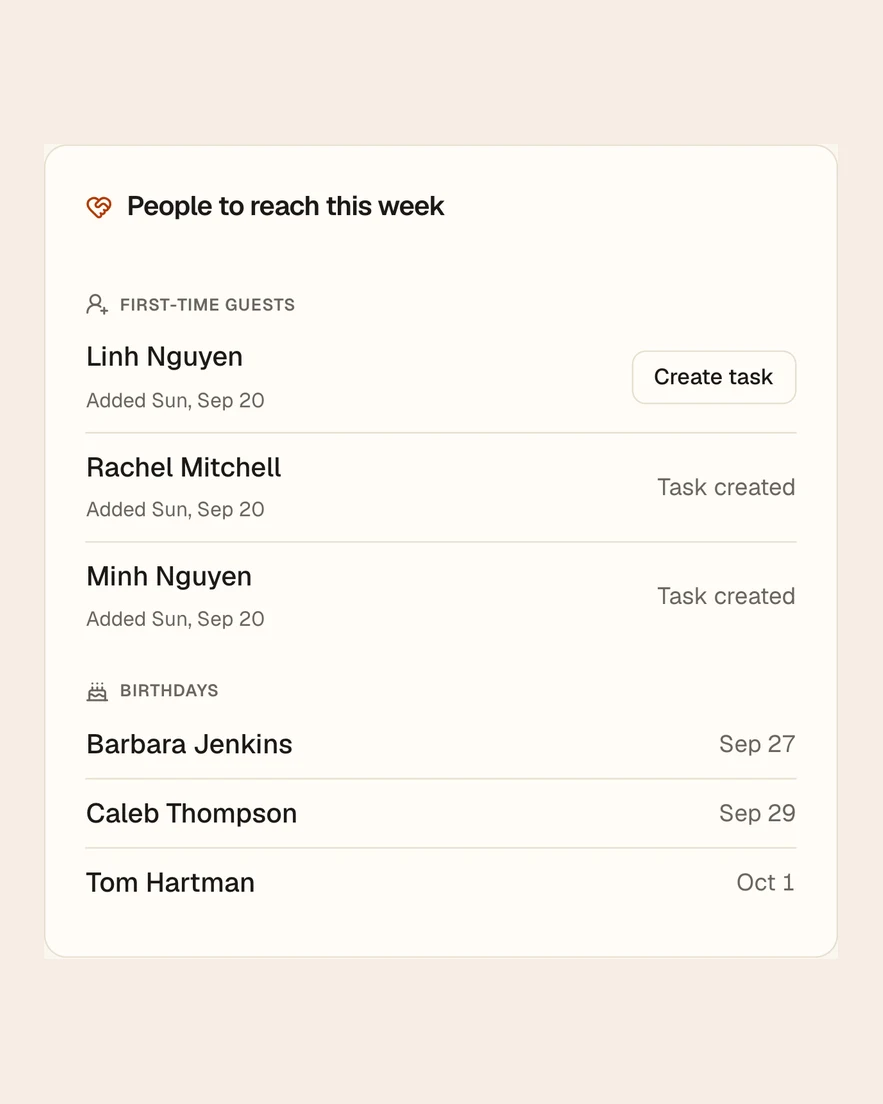
SundayBridge: people to reach this week, from the sample church

01

Follow-up

A family visited three Sundays ago. Someone said they'd call. Nobody knows whether anyone did.

A guest becomes a next step with an owner and a date on it — on a board that shows you what nobody has picked up.

  • Every follow-up has one name against it, so it is never everyone's job and therefore no one's
  • The board ages what's open: a step nobody owns doesn't disappear, it gets louder
  • A kanban view for working the week, and an analytics view for asking whether the week worked
  • Guests, absences, baptism questions, and care hand-offs all land in the same place
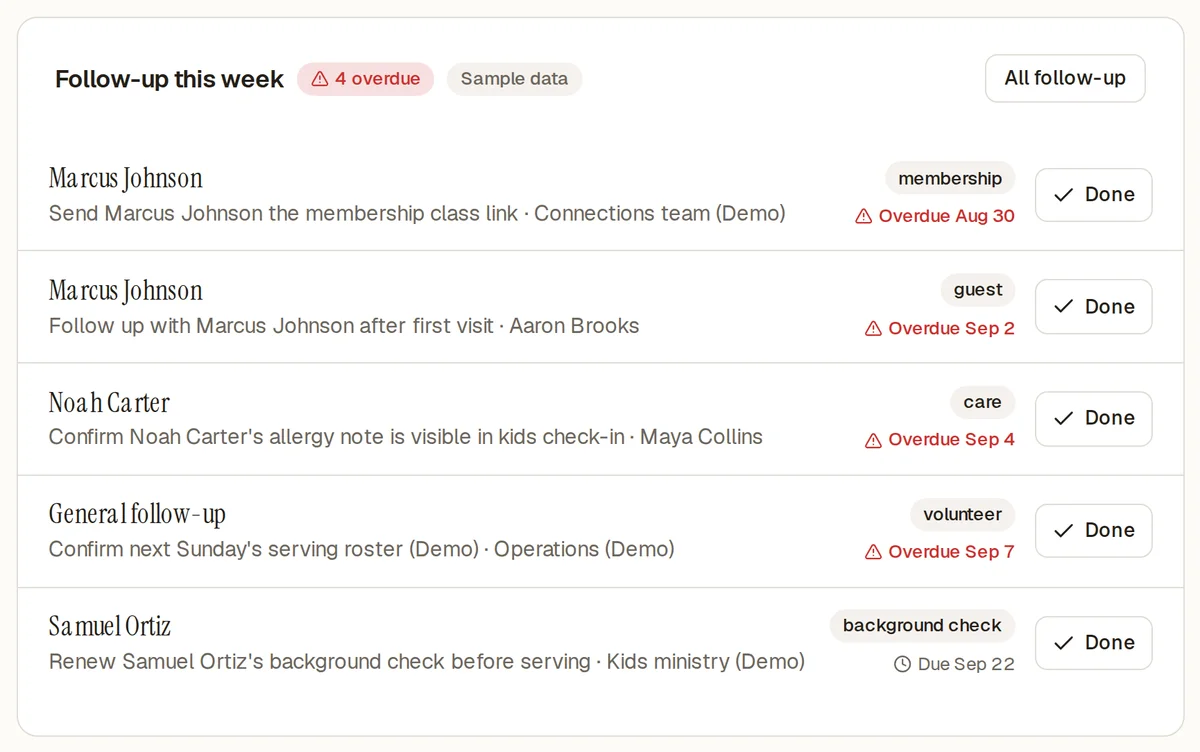
The SundayBridge follow-up board, with each step showing an owner, a due date, and overdue items flagged in red
  • Every card has one name on it — never 'the team'
  • Anything past its date turns red and stays red
  • Guests, absences and care hand-offs all land on the same board

The real screen, from the sample church
People standing together with hands on one another's shoulders during a church service

02

People & households

A name in the directory, a row in the attendance sheet, and a note on somebody's phone are three fragments of one person.

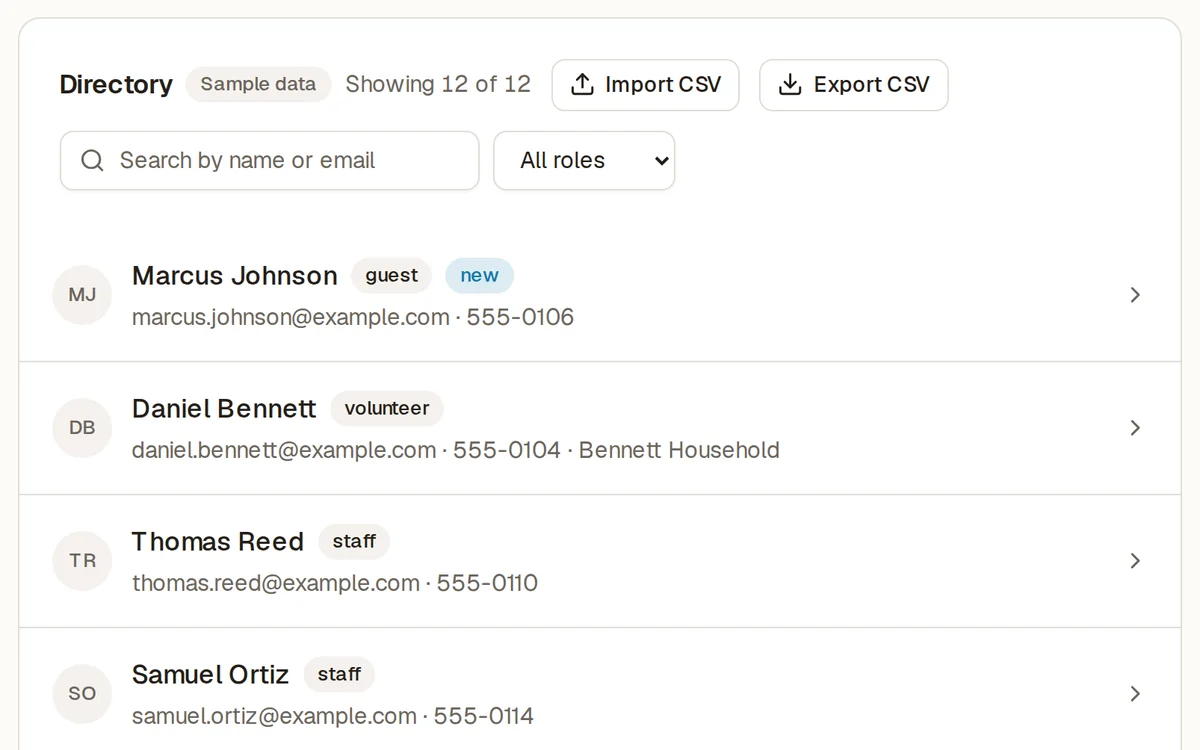
Individuals gathered into the households they actually live in, each with one profile: groups, serving, giving, care, and a readable engagement timeline.

  • Households, not isolated rows — people the way a church already thinks of them
  • One profile per person: their groups, their serving, their attendance, their care
  • An engagement timeline you can read in a glance before you knock on the door
  • Search and filter by role — visitor, member, child, volunteer, staff
  • Import your existing directory from a CSV — a two-step preview that shows exactly what will be created before it writes, with column headers recognized from other church software
  • Export the directory to CSV whenever you want it
The SundayBridge people directory, listing individuals with their household, role and last-seen date
  • Household, not a lone row — people the way a church thinks of them
  • Filter by visitor, member, child, volunteer or staff
  • This is the screen a CSV import lands in, after you preview every row

The real screen, from the sample church
A congregation seated in wooden pews beside tall windows during a service

03

Attendance

The board asks whether attendance is down. You have a feeling, and a feeling is not an answer.

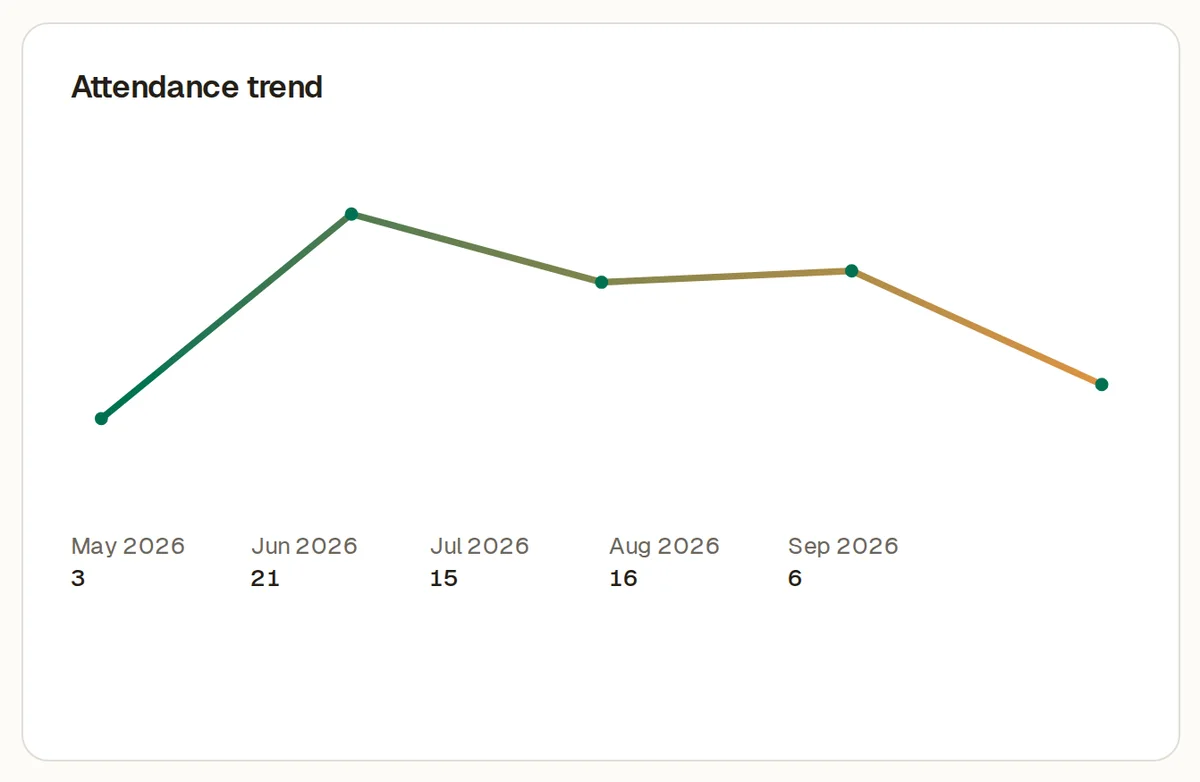
Record a named roster or a simple headcount, then chart attendance against its own history.

  • Pick a past date and gathering, search the member list, check off who was there, and edit it later
  • Use headcount-only entry when your church does not track individual attendance
  • One good Sunday isn't a trend; one bad one isn't a crisis — the chart shows which
  • A quiet regular's absence surfaces on their profile long before it moves the average
  • Session history you can walk back through
The SundayBridge attendance chart, showing weekly attendance for a sample church against its own history
  • Your own history is the baseline — not somebody's benchmark
  • One quiet Sunday is visibly one quiet Sunday
  • Named roster or a plain headcount, whichever your church takes

The real screen, from the sample church
Empty wooden church pews with red cushions in warm afternoon light

04

Giving records (optional)

If your church keeps contribution records here, they should stay organized without taking over the rest of church operations.

An optional manual contribution ledger with trends, a goal to track against, and printable year-end statements.

  • Record, edit, and remove manual contributions — the records stay yours to correct
  • Set a giving goal and watch the year run against it
  • Giving trends over time, without turning generosity into a leaderboard
  • Year-end giving statements, generated and ready to print
The SundayBridge giving page, showing recorded contributions, a goal and year-end statements
  • Recorded by hand against a person, so January is a print job
  • A goal to run the year against
  • Records only — SundayBridge never touches the money itself

The real screen, from the sample church
Two people's hands clasped together in a gesture of comfort

05

Serving teams

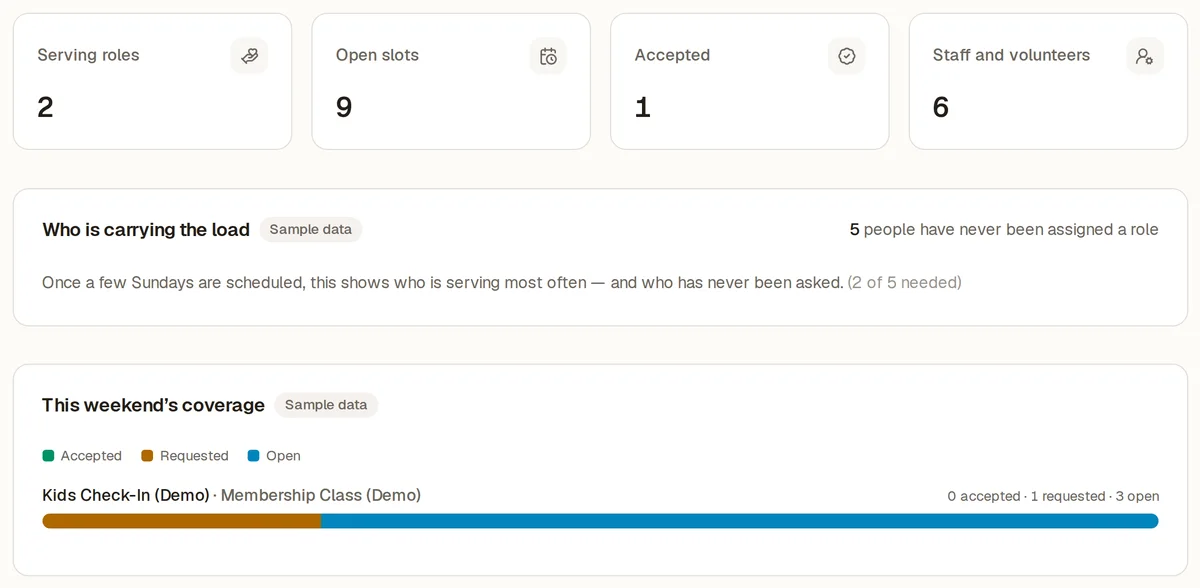
The same four people serve every week. Someone who has never been asked would say yes if anyone asked.

Roles, assignments, and who is actually carrying the load — so serving is scheduled instead of assumed.

  • Define serving roles, then assign and reassign people against them
  • See who is serving every week and who has never been invited
  • Background-check alerts surface on the dashboard before they lapse
The SundayBridge serving page, showing roles, assignments and volunteers who have never been asked
  • Who is carrying the load, in one look
  • Who has never once been asked
  • Background-check dates before they lapse, not after

The real screen, from the sample church

A circle of church volunteers praying together with hands on shoulders

06

Pastoral care

You promised a widow you would visit. It is now three weeks later and it lives only in your memory.

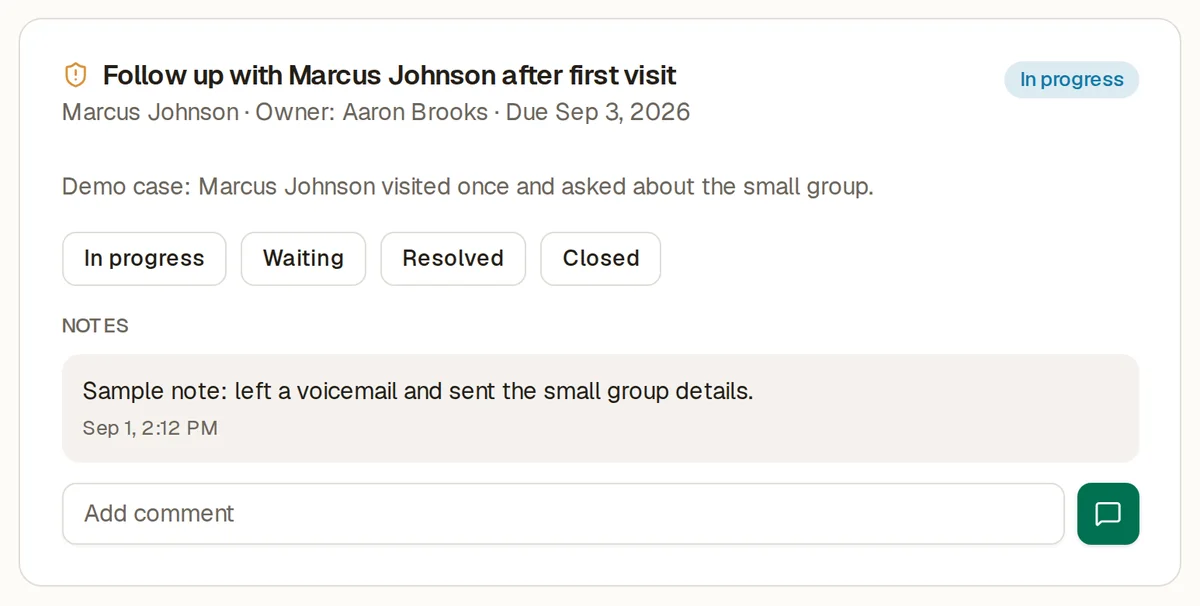
Care cases with comments and history, kept discreetly alongside the rest of a person's record — so the visit that was promised actually happens.

  • Open a case, add comments as it develops, close it when it's resolved
  • Kept beside the person's profile, not in a separate pastoral silo
  • Private notes stay private — the AI assistant can count cases but never reads their contents
The SundayBridge pastoral care page, showing care cases with their status and comment history
  • The visit you promised, with a date on it
  • Comments and history as the situation develops
  • Private notes stay private — the AI can count these, never read them

The real screen, from the sample church
A woman holding a coffee cup at a table with an open Bible

07

Groups

Who is actually in the Tuesday women's group? The answer lives in one person's head.

Small groups, classes, and their membership at a glance instead of across five spreadsheets.

  • Groups with members and leaders, attached to the people record
  • A person's groups show on their profile, and the group's roster shows its people
Light through a stained glass window falling in colour across a stone wall

08

Gatherings

The church calendar is a whiteboard, and who came to the potluck is a memory.

A month calendar with the people attached to each event, so attendance at a gathering becomes part of the record.

  • Create, edit, and remove events on a month calendar you can navigate
  • Registrations tie people to the gatherings they came to
A white church steeple with a cross, framed by tree branches

09

Sunday school

Read-only today

Which children are in which class, with which teacher, in which room?

Classes, teachers, rooms, and enrollment, visible in one place.

  • Enrollment by class, with the teacher and room against it
  • Feeds the Sunday school enrollment report
Empty church pews lit by warm evening light, with a wooden cross beyond

10

Reports

Read-only today

The elders want numbers by Thursday and you want to spend Thursday with people.

Twelve reports across every module — charted, pivoted, grouped, and exportable to CSV.

  • Bar, stacked, grouped, line, and donut charts, plus a pivot table with group-by controls
  • Export the pivot or the raw rows to CSV, from any report
  • Congregation, gatherings, serving, care, and giving — every module reports
A congregation seated in pews during a Sunday service, seen from the balcony

Ask AI

An assistant that only knows your church.

Ask a question in plain English. The assistant reads the records you already keep and answers from what it finds — 10 questions a month, included in the $19 plan, with no AI add-on to buy.

What it's allowed to read

Six read-only summaries. Not your database — these, and nothing else.

Congregation summary

Head counts by role, household totals, and who is new.

Attendance trend

Weekly attendance across its own history.

Giving summary

Totals and trends — never which individual gave what.

Follow-up status

What's open, what's owed, and how long it has been.

Groups and serving

Membership and assignments across teams.

Care cases

Counts and status only — never the contents of a private note.

Three guarantees

  • It sees your church and no other. Your data is scoped at the database, not asked nicely in a prompt. No tool the assistant can call even has a field for naming a church — so another congregation's records cannot be requested, because they cannot be addressed. Underneath, the query runs as a read-only Postgres role that returns zero rows if the church isn't set. Your question and the selected summaries needed to answer it are sent to our AI provider to generate the response; they are not used to train its models.
  • It never makes a number up. The assistant is forbidden from doing arithmetic. Every figure comes from the same code that draws your dashboard, and for the insight panels any number the model writes that isn't in the allow-list of real figures is thrown away and replaced with a plain template. A wrong number can't reach the page.
  • It says when it doesn't know. If your records don't contain the answer, it tells you which tab would show it rather than guessing. If a report is empty, it says the record is empty. It will not speculate about a family's giving or a person's absence.

Ask AI is switched off in the public demo — the demo church's records aren't yours to ask about. Every answer is stored with the summaries it read, so an elder can audit it later.

app.sundaybridge.com/ask

Which regulars have quietly stopped coming?

Four people who attended at least twice a month have missed the last three Sundays: Marcus Bell, Priya Nair, and the two adults of the Okafor household. None of them has an open follow-up.

Read attendance trend, congregation summary.

How did giving do this quarter against last year?

Giving this quarter is $71,480 across 138 givers, up 6% on the same quarter last year ($67,410). The giver count is essentially flat — the increase is in average gift, not in more people giving.

Read giving summary.

Is the Alvarez family planning to become members?

Your records don't say. I can see the Alvarez family first visited on July 5 and has attended twice since, but membership intent isn't something SundayBridge stores. The Follow-up tab is where a conversation about it would be recorded.

No tool returned an answer.

7 of 10 questions left this month · answers come from your records, not the open internet

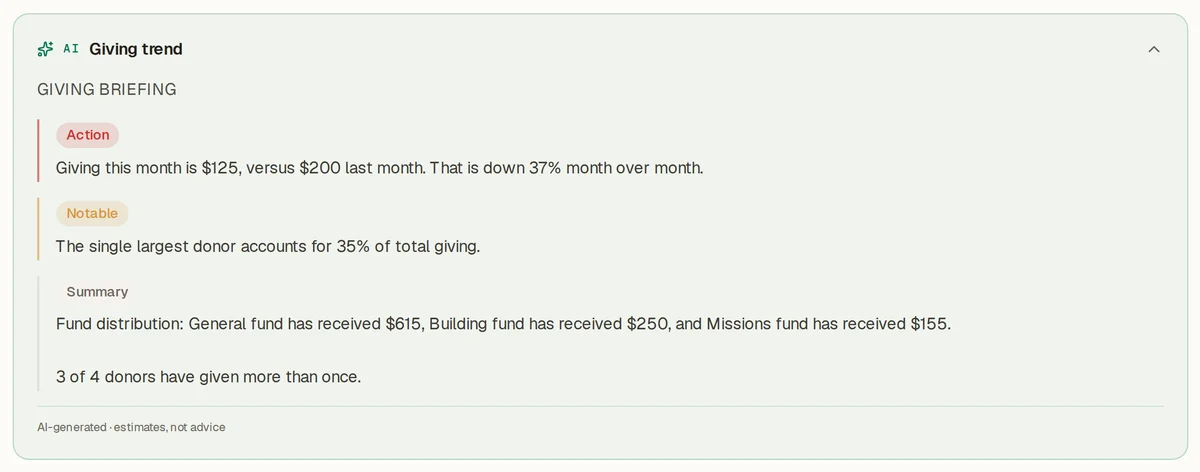
AI insights

A plain-language read of what changed, at the top of 12 pages.

You never ask for it — it's there when you open the tab. And the way it's built is the reason you can trust the number in it.

01

Detect

Ordinary deterministic code — no model — finds what's unusual: the follow-up sitting a week, the attendance stretch, the volunteer serving every Sunday.

02

Scrub

Before anything is sent, emails, phone numbers, and birthdates are stripped out. The model never receives them.

03

Narrate

The model writes one short paragraph. It is explicitly forbidden from calculating anything.

04

Check

Every number it wrote is compared against the real figures. Any number that isn't one of them, and the whole paragraph is discarded for a plain template.

Estimates, not adviceNo PII leaves the databaseRefreshed daily, cached, capped

Reports & export

Twelve reports, and the CSV under each one.

Chart it, pivot it, group it by whatever you like, then export the pivot or the raw rows. Your people directory exports to CSV too — your records are yours, and they leave in a format anything can read.

Congregation

  • Congregation makeup
  • New people over time
  • Households
  • Group membership

Gatherings

  • Attendance
  • Event registrations
  • Sunday school enrollment

Serving

  • Serving assignments

Care

  • Follow-up
  • Pastoral care cases

Giving

  • Giving
  • Givers

On purpose, and honestly

What SundayBridge isn't — yet.

Every church-software page you have read this month claimed everything. Here is the list we'd rather you saw before you paid us, not after.

See what's shipped and what's planned →

Switching

Switching from Planning Center, Breeze, or ChurchTrac?

We know what you're actually afraid of, and it isn't $19. It's spending a Saturday moving four years of directory into a new system and discovering on Sunday that half the households came through wrong. So here is exactly how the import works, with nothing glossed.

  1. Export from the old system.Whatever CSV it gives you. You don't have to reformat it, rename columns, or delete the ones we don't use.
  2. Upload it and look at every row.The importer shows you exactly what it's about to create — person by person, household by household — before a single record is written. The column names Breeze and Planning Center exports use are recognized on sight.
  3. Commit it, once it looks right.Nothing is saved until you say so. If the preview looks wrong, close it and nothing happened.

If your export is a mess, send it to us. We'll get it in for you, free.

That's not a sales gimmick with a minimum church size on it. Reply to any email from us and a human answers within one business day.

The SundayBridge people directory, showing households and roles for an imported congregation
Preview before it writesHeaders recognizedExport back out anytime

This is the directory after an import, in the live sample church. Open it and click around — no signup.

Your data never stops being yours, either: the directory and all twelve reports export back to CSV whenever you want them, including on the way out.

Don't take the list on faith.

Every module above, in your own church, for 30 days. We don't ask for a card to let you find out.

Start free for 30 days

30 days free · no card required · then $19/month · cancel anytime

Or walk the live demo first — a fully populated sample church, no login.